The Family Follow-Along sheet is a printable summary of the week's lesson, written for the family rather than the teacher. Print a stack before class and send one home with each child — no signup, no app, nothing for parents to remember.
It's the simplest way to support parents. To get the same lesson into every family's inbox each week without printing anything, see the Weekly Take-Home Email, which links to this sheet. Everything else for parents lives on Parent Engagement.
What's on the Sheet
The sheet is built from the same lesson you're teaching that week, so it always matches what happened in class. It's organized in three blocks:
Bible Story
- This Week's Scripture — the passage the class read
- Story Summary — an overview of the story, so a parent who wasn't there can pick up the thread
Print & Watch at Home
- The lesson's coloring sheets and videos, linked so a family can pull them up during the week. This section only appears when the lesson has them.
During the Week
- Comprehension Questions — what happened in the story, with the answers printed underneath, so a parent can ask them at dinner without having reread the passage first
- Faith Questions — open-ended questions that start a conversation about faith
- Memory Verse — the verse the class is working on
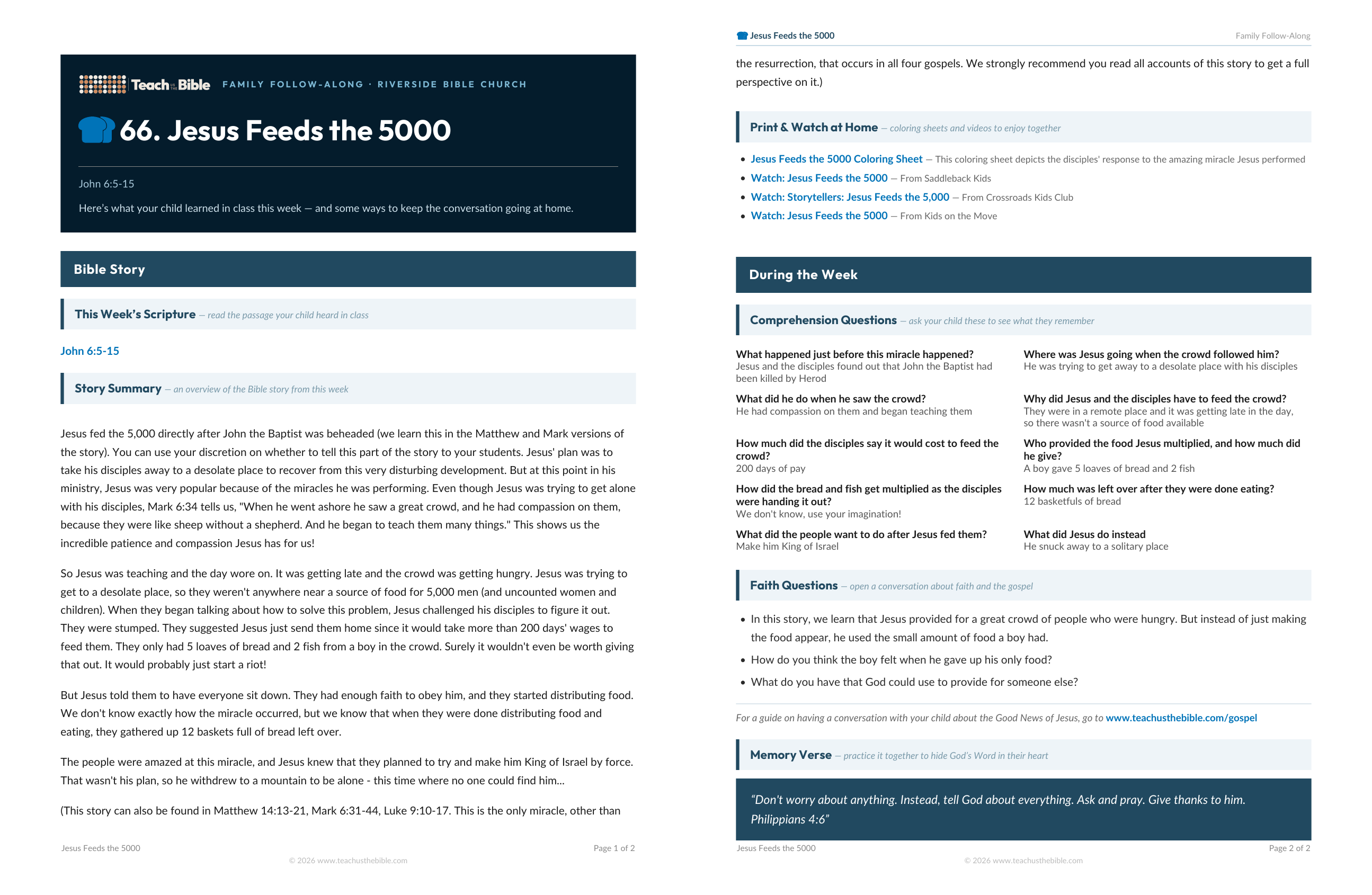
Under the faith questions, the sheet points parents to teachusthebible.com/gospel — a short guide for a parent who wants to talk with their child about the Good News but isn't sure how to start.
Your ministry's name is printed across the top of every sheet, so a parent knows where it came from once it's on the fridge.
Length depends on the lesson — usually one to two pages. The sheet is sized for standard US Letter paper and downloads as a PDF named after the lesson, so a folder of them stays organized.
Where to Find It
Anywhere you see the Take-Home Sheet button, clicking it downloads the PDF for that lesson right away. There are four places it shows up:
On the lesson page
At the top of any lesson, beside the title. This is the one to use when you're prepping a specific week.

In the menu, under your next lesson
The menu shows whatever you're teaching next, with a take-home sheet button beside it. The quickest route most weeks.
On the Looking Ahead page
Every upcoming lesson is listed with its own take-home sheet link — useful if you'd rather print a month at a time than remember it each week.
On the parent page itself
The Download Printable PDF button at the top of any parent page. See Letting Parents Download It Themselves below.
Printing for Your Class
Print one per family rather than one per child — siblings in different classes will each bring home a different sheet, which is usually what you want, but a single family with three kids in the same class only needs one.
Because the sheet is generated from the lesson each time you download it, a correction you make to the lesson shows up on the next download. If you print a month ahead and then edit a lesson, re-download that week's sheet.
Letting Parents Download It Themselves
Every parent page has a Download Printable PDF button, and it does not require the parent to log in or have an account. If a parent hits Print or Ctrl‑P on the parent page, they get the PDF too — it prints better than the web page.

That makes it a good fit with the shareable parent page links on the Parent Engagement page: paste the link in your bulletin or group text, and a parent who wants a paper copy can make their own.
Who Can Download It
- Anyone on your team — teachers as well as ministry administrators. Whoever is teaching that week can print their own stack without asking an admin.
- Parents with a parent page link — no account needed, as described above. That includes every parent who gets the weekly take-home email, which carries a Print the take-home sheet link.
The sheet is part of your Ministry Edition subscription. If your subscription lapses, the buttons stop working — see Subscription & Billing.
Seeing Who's Using It
Take-home sheet downloads appear in your Team Activity feed alongside logins, ratings, and lesson PDFs, so you can see whether the sheets are actually going home. Downloads a parent made from a parent page show as “A parent”, since there's no account attached to them.
These downloads are counted separately from the view counts on the Parent Engagement page — that number tracks parent pages being opened, not sheets being printed.
On this page
Supporting parents
- Parent Engagement
- Weekly Take-Home Email
- Email Parents
- Parent Portal
- Take-Home Sheet
Need help?
support@teachusthebible.com